Past, present, and future of Akua's internal platform
How we replaced AWS DMS with data-replicator: our in-house replicator with an exactly-once guarantee, bounded failures, and alerts that don't stay silent.
Today I want to share a bit about the past, present, and the future we envision for Akua's IDP (Internal Developer Platform). To kick things off, a quote from Kung Fu Panda:
“Yesterday is history, tomorrow is a mystery, but today is a gift; that is why it is called the present.”
Why bring this up? Because a lot has happened since June 2024, when we started designing Akua's internal developer platform alongside German Yepes, my teammate and friend, who in December 2025 decided to move on to new adventures outside Akua. Along the way, we were also joined by Guille Pijuan, who remains at Akua today on the CX (Customer Experience) team. And in the present, I share the team with Cristian Ortega (Cris) and Jeremy Bacher (Jere).
Almost two years ago, we shared what our IDP is. Today, I'm here to tell you about one project in particular: Goodbye AWS DMS (Database Migration Service).
This post marks the start of the Platform trilogy: it's my turn to open, and very soon, Cris and Jere will share other technical challenges we're proud to discuss. Let's dive in.
01 · Yesterday is history
AWS DMS: when the problem isn't failing, but failing silently
First, a bit of context on how data moves at Akua: each project has its own Aurora PostgreSQL database, and each tenant has its warehouse—the ODS (Operational Data Store). That's where databases from all projects come together, so anyone who needs to query that data does so against the ODS and not against the production database.
To move data from one side to the other, we used AWS DMS Serverless, which in theory is exactly what you need: it performs an initial load and then replicates changes in real time (CDC, Change Data Capture). In theory.
In practice, DMS failed. And what hurt us most wasn't that it failed (everything fails sooner or later), but how it failed: in silence. Here is what we found the day we actually took a hard look:
- Dead replications with nobody noticing: 8 replications in a failed state for months, without any signal.
- A “running” status that wasn't running: tables in Table error while the replication reported being running. The console showed that everything was fine, yet the table hadn't received data in ages.
- Duplicates everywhere: a warehouse with rows duplicated between 80 and 100 times. Yes, you read that right.
- And on top of that, expensive: around USD 7,400 per month.
Why was it duplicating?
DMS stores its “how far I've replicated” status (the checkpoint) on one side and writes the data on the other. If something cuts out between the two, upon recovery it can reapply what it had already written. Keep this detail in mind, because this is precisely what we solved differently.
The first of our mantras from Build on Difference states that platform operations and maintenance must tend to zero. With DMS, the exact opposite happened: you had to actively operate it just to find out it was broken.
So we asked ourselves the uncomfortable question: what if we build it ourselves? It's not a decision you make lightly, because everything you build, you have to maintain later. But when the tool tells you everything is fine while the floor underneath is catching fire, the math starts making sense pretty quickly.
02 · Today is a gift
data-replicator: simple on purpose
The data-replicator is a process written in Rust (the reasoning for Rust is worth its own post) that copies each project's Aurora PostgreSQL databases to their tenant's ODS and keeps them up to date in real time.
Project's Aurora ──pgoutput (logical slot)──▶ data-replicator ──SQL──▶ Tenant's ODS
   publication                                1 pod per tenant         schema public_<p>
   dedicated user                             1 task per pipeline      + origin per pipeline
The architecture is simple on purpose (another of our mantras: simplicity above all). It runs one pod per tenant in Fargate with all pipelines for that tenant, where a pipeline corresponds to a source database. If one pipeline breaks, the others don't even notice: each one runs isolated and supervised independently.
~USD 7,400per month with AWS DMS
~USD 72per month per data-replicator pod
Here is what the full picture looks like; we'll cover each piece in the sections that follow:
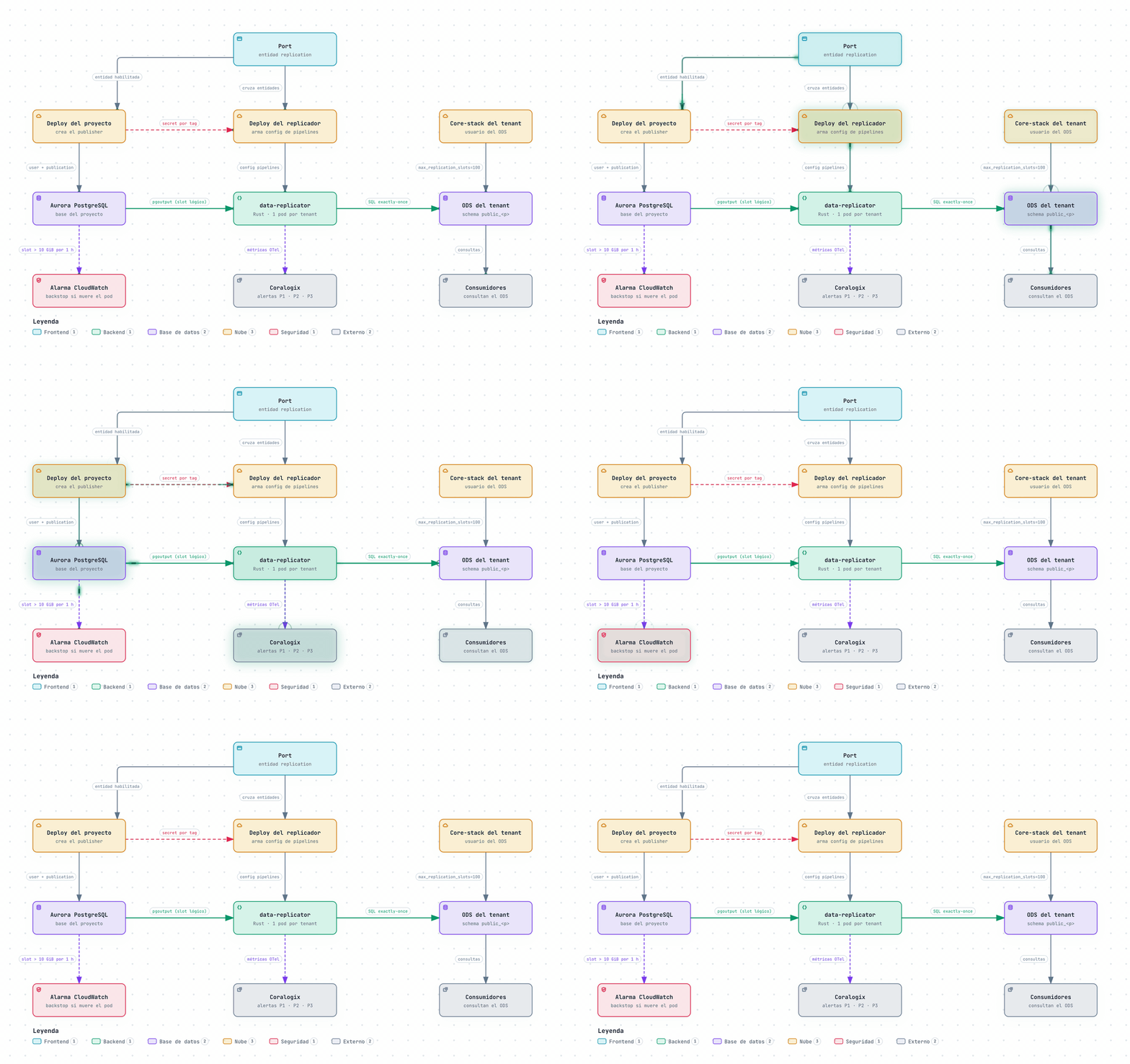
Figure 1 · data-replicator: from Aurora to the ODS per tenant
Wait a second, what is a slot?
For anyone who has never had to wrestle with PostgreSQL logical replication, here is a mini glossary:
- Publication: defines which tables in the database are published; in our case, all of them (FOR ALL TABLES).
- pgoutput: the native PostgreSQL plugin that reads the WAL and emits transactions as messages (Begin, Insert, Update, Delete, Commit…).
- Slot: a persistent cursor at the source that retains the WAL until the consumer confirms it has been processed. Heads up: if nobody consumes it, disk usage just keeps growing.
- LSN: the position within the WAL; the “where I am right now”.
The lifecycle of a pipeline
Each pipeline goes through four stages:
- Bootstrap. Connects to the source with a dedicated user and to the ODS, verifies that the publication exists (created by the platform during project deployment, not by the pod), and ensures no table lacks a primary key. This last point isn't arbitrary: in PostgreSQL, if you publish a table without replica identity, the application's UPDATE and DELETE statements on that table start failing. The gate exists to protect the project, not the replicator.
- Consistent full load. Creates the slot by exporting a snapshot and copies each table under that snapshot using COPY. On the ODS side, the TRUNCATE, the data, and the status marker are all wrapped in a single transaction per table: either the table ends up complete and active, or nothing remains. No half-loaded tables.
- CDC. Starts exactly from the consistent point of the slot, so between the initial load and the ongoing changes, there are no gaps or duplicates. Each source transaction is applied as a transaction in the ODS, using prepared and pipelined statements (sent in batches of 500 without waiting for a response): a small transaction costs one round-trip instead of six.
- Restart. Reuses the existing slot and resumes from the last applied commit. No full load, unless the bootstrap was left halfway through.
The complete cycle, edge cases included:
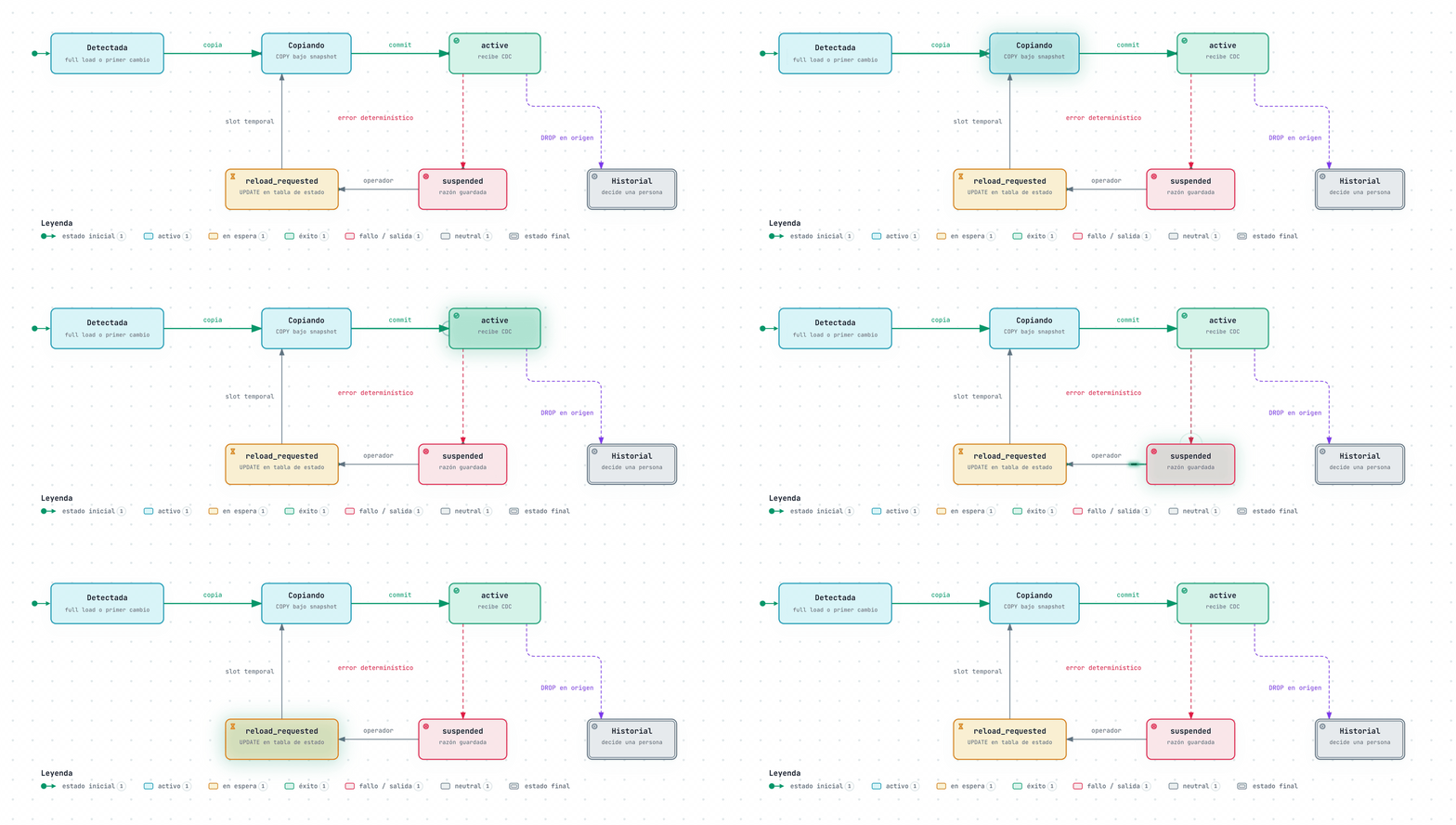
Figure 2 · The lifecycle of a pipeline
03 · The heart of the matter
Exactly-once, the guarantee DMS doesn't provide
Remember the checkpoint DMS stores separately? We make sure the data and the position are committed together, in the same ODS transaction, using PostgreSQL replication origins:
-- simplified: once per session, the applier binds to its pipeline's origin
SELECT pg_replication_origin_session_setup('<pipeline origin>');

-- for each transaction arriving from the source
BEGIN;
SELECT pg_replication_origin_xact_setup('<end_lsn>', '<commit_ts>');
INSERT ...; UPDATE ...; DELETE ...;
COMMIT; -- data and "how far I got", committed together or not at all
What does this mean in practice? If you run a kill -9 on the pod midway through a transaction, either everything was applied or nothing was. And upon restart, it resumes exactly from the last commit, skipping what was already applied. We validated this by breaking things on purpose in dev, including slot rewinds and Aurora failovers.
Step by step, kill -9 included:
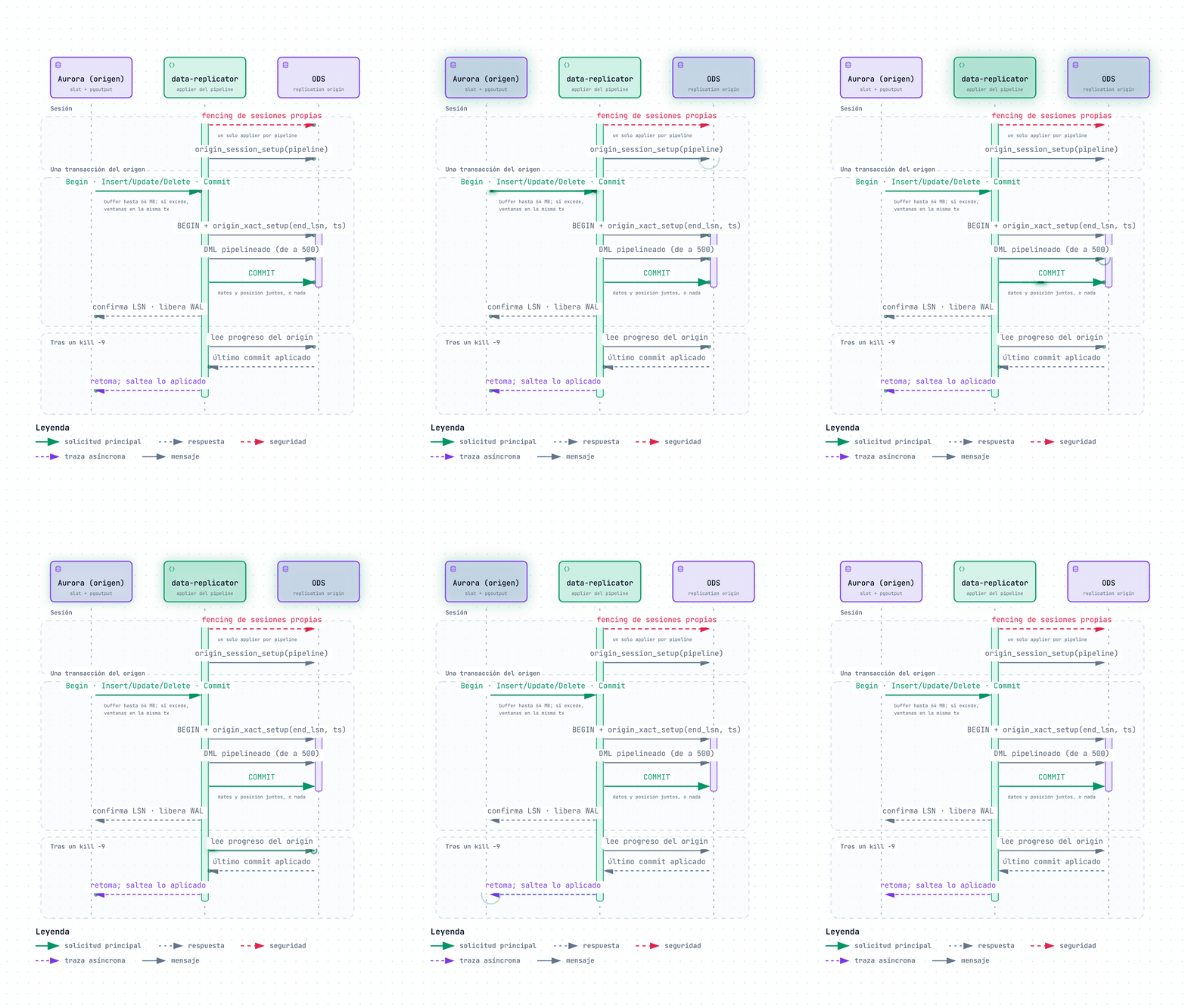
Figure 3 · Exactly-once with replication origins
The fine print
Nothing is free, and this approach has its requirements too:
- One replication origin per pipeline in the ODS. This forced us to increase max\replication\slots from 20 (the default) to 100. It's a static parameter, which means rebooting the writer. DMS didn't need this precisely because it stores its checkpoint separately.
- Only one applier per pipeline, always. The Deployment runs with strategy: Recreate (no rolling updates with two pods writing simultaneously) and, on startup, fences off any lingering sessions of its own. KEDA and HPA are strictly forbidden on this Deployment, and we're not kidding.
04 · Resilience
Failing loudly and failing small
If DMS failed silently and at scale, here the goal was the exact opposite: fail loudly and as narrowly as possible. A few examples:
- Deterministic error in a table (a type mismatch, a constraint violation, a missing column): only that table is suspended, the reason is logged, and a P1 alert triggers. The rest of the pipeline continues uninterrupted.
- Source adds a column: the ADD COLUMN is automatically replicated, carrying the value the source materialized for older rows. That way, a DEFAULT 'x' leaves previous rows identical on both sides. If the default is volatile (clock\_timestamp(), nextval()), those rows remain NULL on the destination and the replicator alerts.
- New table at the source: detected on its first change and copied automatically.
- Source deletes a table: not propagated (DMS did propagate this). The copy is kept for historical record and a human decides; deleting data isn't something we want happening on autopilot.
- A destination table with another owner: if another writer created a table with our name (this happened to us when a deployment spun up an old DMS instance again), that table is suspended and never overwritten.
- Giant transactions: buffered up to 64 MB; if larger, applied in windows within the same ODS transaction. Memory is bounded by the window, not the transaction size. I confess that up to v0.2.11 that was a hard cap, and any transaction exceeding it sent the pipeline into an infinite loop; you learn from your mistakes.
- Network drop or restarted ODS: reconnects with backoff and replays from the origin. Thanks to exactly-once, there is nothing to clean up.
And how do you recover a suspended table? An UPDATE on the replicator's state table changes it to reload\_requested, and the replicator takes care of creating a fresh copy through a temporary slot on its own. From a table's perspective, the cycle looks like this:
Figure 4 · State of a replicated table
Making silence trigger alerts too
All metrics are exported via OpenTelemetry to Coralogix with the pipeline as a label: state of each table, lag in seconds and retained WAL bytes, discarded events, reconnections, and applied transactions. On top of that, we set up three alert tiers:
- P1: suspended table.
- P2: high lag, silent pipeline, or discarded events.
- P3: sustained reconnections or retained WAL.
Notice “silent pipeline”: that's the alert that would have saved us those months of DMS stuck in failed.
Now, what happens if the pod itself crashes? A dead pod can't alert that it's dead. For that, we have a safety net at the source: a CloudWatch alarm per cluster that fires if the slot retains more than 10 GiB for one hour. That alarm outlives the pod.
And for day-to-day operations, a query that shows the health of a tenant at a glance:
-- tenant health, in the ODS: no_activas must be 0
SELECT p.pipeline, p.target_schema,
       count(t.table_name) FILTER (WHERE t.state = 'active')  AS activas,
       count(t.table_name) FILTER (WHERE t.state <> 'active') AS no_activas
FROM _replicator.pipeline_state p
LEFT JOIN _replicator.table_state t USING (pipeline)
GROUP BY 1, 2 ORDER BY 1;
05 · Autodiscovery
A toggle in Port and the rest autodiscovers
Port is our presentation layer, so things couldn't be any different here. Each project has a replication entity in Port with the bare minimum: whether it is enabled, which schema it writes to, and a few options, with overrides per tenant and environment. From there:
- Project deployment: if the entity is enabled and the replicator exists in the tenant, it creates the publisher: the user, the publication, the security group rule from the pod, and a secret with the connection string. The primary key gate mentioned earlier lives here.
- data-replicator deployment: discovers those secrets by tag, cross-references them with Port entities, and builds the pipeline configuration. An enabled entity without a publisher, or a publisher without an entity, logs a warning and proceeds.
- Tenant core-stack: creates the user on the ODS side and sets max\replication\slots to 100.
Pausing a pipeline is as simple as setting enabled: false. Caution: deleting the entity deletes the publisher and leaves the slot without a consumer—and you already know what happens to a slot without a consumer (yes, the alarm from the previous section).
A rule that saved us from more than one headache: the project deploy happens after enabling the entity, and success is verified by checking that the publisher's secret exists, not because the pipeline reported “finished.”
06 · Migration
Shadow and cutover: changing the engine while the car is moving
We didn't want a big bang. In tenants where DMS was still running, each pipeline writes to a parallel schema, shadow\_, using the same table names DMS leaves in public. This allows them to coexist without stepping on each other, lets us compare parity against real traffic, and gives consumers time to build their indexes on the shadow schema without pressure.
End to end, here is how the path looks:
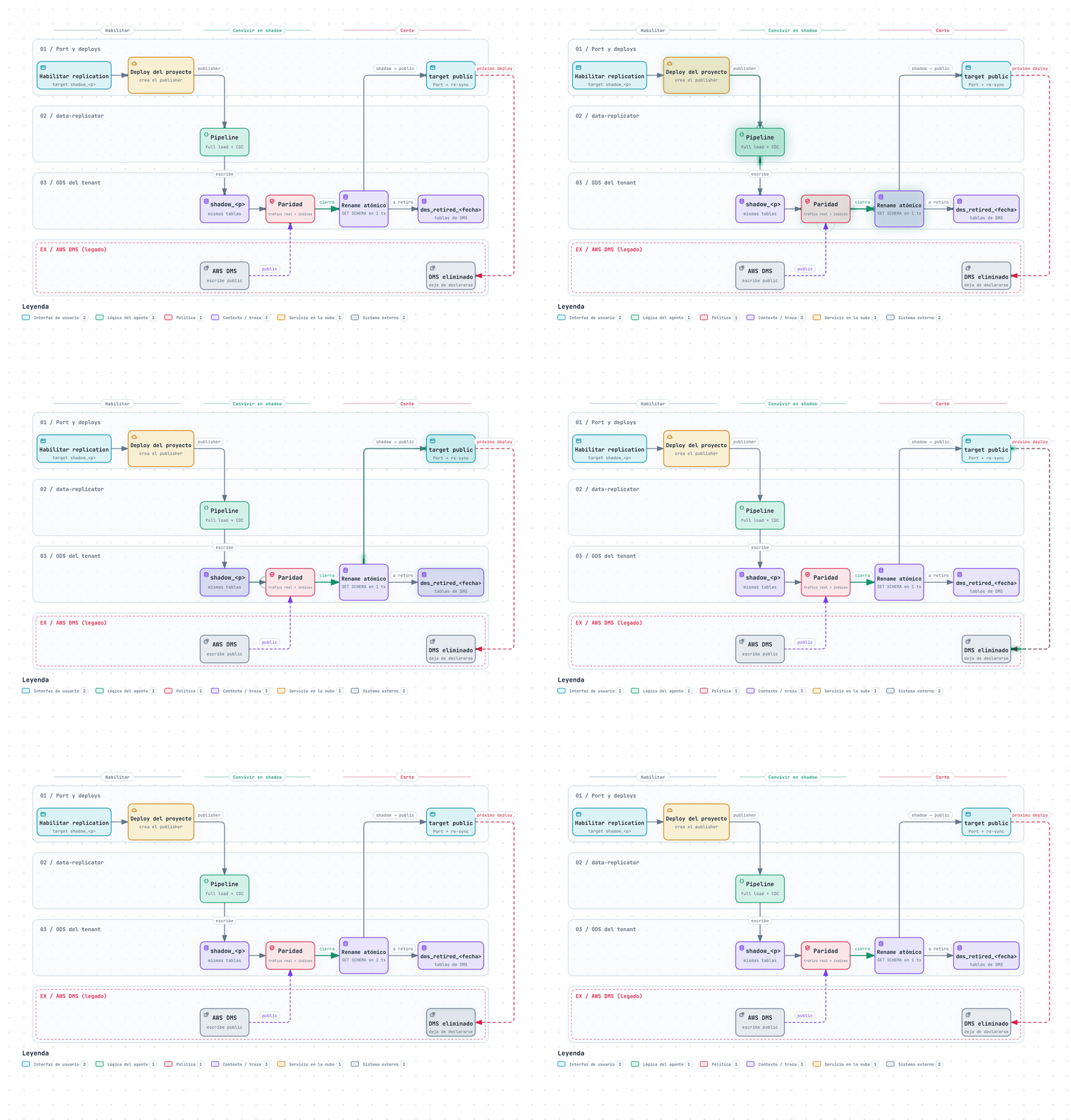
Figure 5 · Shadow and cutover: from DMS to data-replicator
When everything checks out, the cutover is an atomic rename within a single transaction:
ALTER TABLE public.<table_name>     SET SCHEMA dms_retired_<date>;  -- DMS tables, retired
ALTER TABLE shadow_<p>.<table_name> SET SCHEMA public;              -- our tables, to production
-- ...repeated per table, updating the pipeline's target_schema
COMMIT;
SET SCHEMA carries over indexes, constraints, and permissions: there is no full load, the window lasts seconds, and rollback is symmetrical (the exact reverse operation). Afterwards, the target schema is updated in Port, resynced, and the project's next deployment deletes its DMS instance automatically: if the replication entity is enabled in public, the replicator owns it and DMS is no longer declared.
114pipelines in production already cut over to public
23pipelines running in dev
Numbers as of late October 2026.
07 · Tomorrow is a mystery
What's next
As Master Oogway says, tomorrow is a mystery, but a few things are already on our radar:
- Finishing the cutovers and shutting down the last DMS instance. That day calls for a celebration.
- Hot reloading configuration. Today, changing config restarts the pod; it's a clean restart because all pipelines resume from their origin, but we want to mount the config as a ConfigMap and reload it live.
Takeaways
Four rules tattooed on our minds
- The source of truth for the ODS is the ODS itself—not DMS metrics, and not what a console claims.
- Any AWS API count that returns exactly 100 is pagination. Sounds like a joke, but it isn't.
- Failing is fine; failing in silence is not. I'll take a suspended table with its documented reason and a P1 alert a thousand times over a “running” status that isn't running.
- Shadow before big bang: coexist, compare, and only then cut over.
This was the first chapter of the trilogy. In upcoming posts, Cris and Jere will share their side of the story. Until next time!
Sources and recommended reading
- PostgreSQL: Logical Replication
- PostgreSQL: Logical Decoding
- PostgreSQL: Replication Progress Tracking (replication origins)
- PostgreSQL: Replication Management Functions
- PostgreSQL: ALTER TABLE … REPLICA IDENTITY
Next step
Want to explore the infrastructure behind Akua?
Talk to our team and discover how we build a reliable, observable payment platform ready to scale.
Talk to our team